【公告】游戏无法登录,提示未能解析此远程名称解决方法
发布于 2022-01-08 11:50:36
<p>
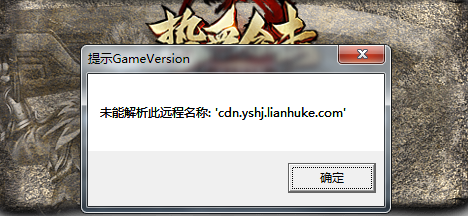
<span style="font-family:lucida sans unicode,lucida grande,sans-serif;"><span style="font-size:16px;">游戏无法登录,提示未能解析此远程名称:cdn.yshj.lianhuke.com<br />
<img alt="" src="https://image.tanwan.com//resource/rxhj_new/h002/h96/img202201081210540.png" style="width: 468px; height: 216px;" /><br />
处理方法如下:</span></span></p>
<p>
<span style="font-family:lucida sans unicode,lucida grande,sans-serif;"><span style="font-size:16px;"><strong>1、首先获取远程名称服务器IP地址:</strong><br />
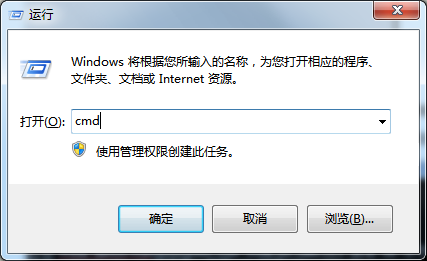
快捷键:<strong>win+R</strong> 打开运行,输入<strong>cmd</strong>,然后确定<br />
<img alt="" src="https://image.tanwan.com//resource/rxhj_new/h002/h96/img202201081155100.png" style="width: 427px; height: 261px;" /><br />
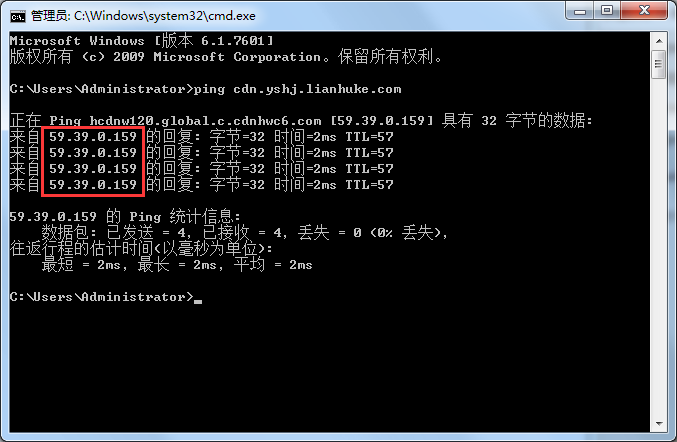
输入:<strong>ping cdn.yshj.lianhuke.com</strong> 回车,获取对应请求数据如下:可得到IP为:<strong>59.30.0.159</strong><br />
<img alt="" src="https://image.tanwan.com//resource/rxhj_new/h002/h96/img202201081159390.png" style="width: 677px; height: 442px;" /><br />
<strong>2、修改bosts来指定该域名访问的特定IP</strong><br />
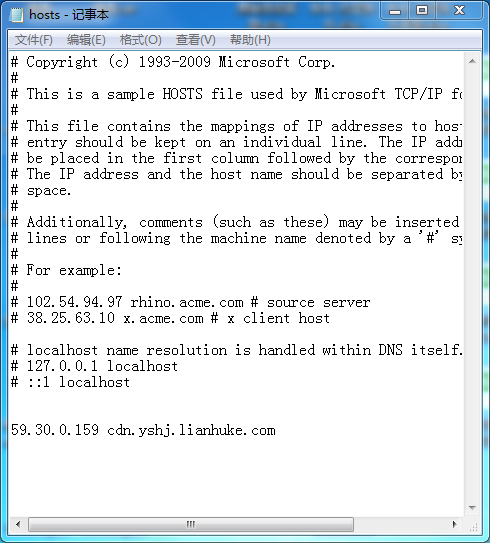
进入<strong>C:\Windows\System32\drivers\etc</strong> 目录,找到hosts文件,文本方式打开,在文件尾部加入以下内容:<br />
<strong>59.30.0.159 cdn.yshj.lianhuke.com</strong><br />
<img alt="" src="https://image.tanwan.com//resource/rxhj_new/h002/h96/img202201081224160.png" style="width: 490px; height: 543px;" /><br />
保存hosts文件<br />
<span style="color:#ff0000;">注:如果直接在目录下修改无法保存,可以把hosts文件复制到桌面修改完再覆盖目录下的hosts文件即可</span></span></span></p>
<p>
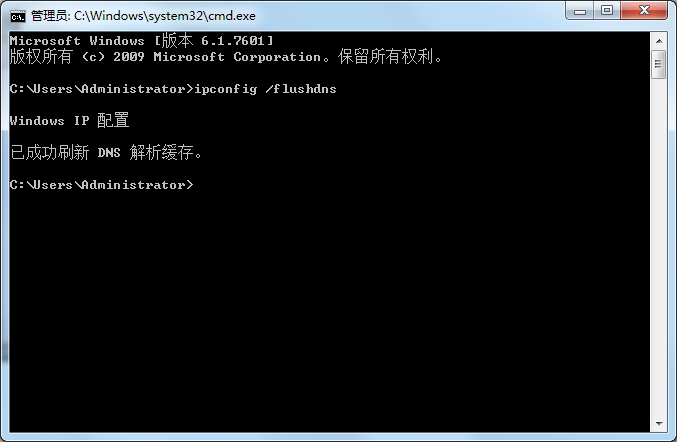
<span style="font-family:lucida sans unicode,lucida grande,sans-serif;"><span style="font-size:16px;"><strong>3、使hosts立生效</strong><br />
命令行(cmd)运行:<strong>ipconfig /flushdns</strong><br />
<img alt="" src="https://image.tanwan.com//resource/rxhj_new/h002/h96/img202201081208060.png" style="width: 677px; height: 442px;" /></span></span></p>
<p>
<span style="font-family:lucida sans unicode,lucida grande,sans-serif;"><span style="font-size:16px;"><strong>4、操作完以上步骤之后,重新打开游戏即可</strong></span></span><br />
<br />
<br />
</p>